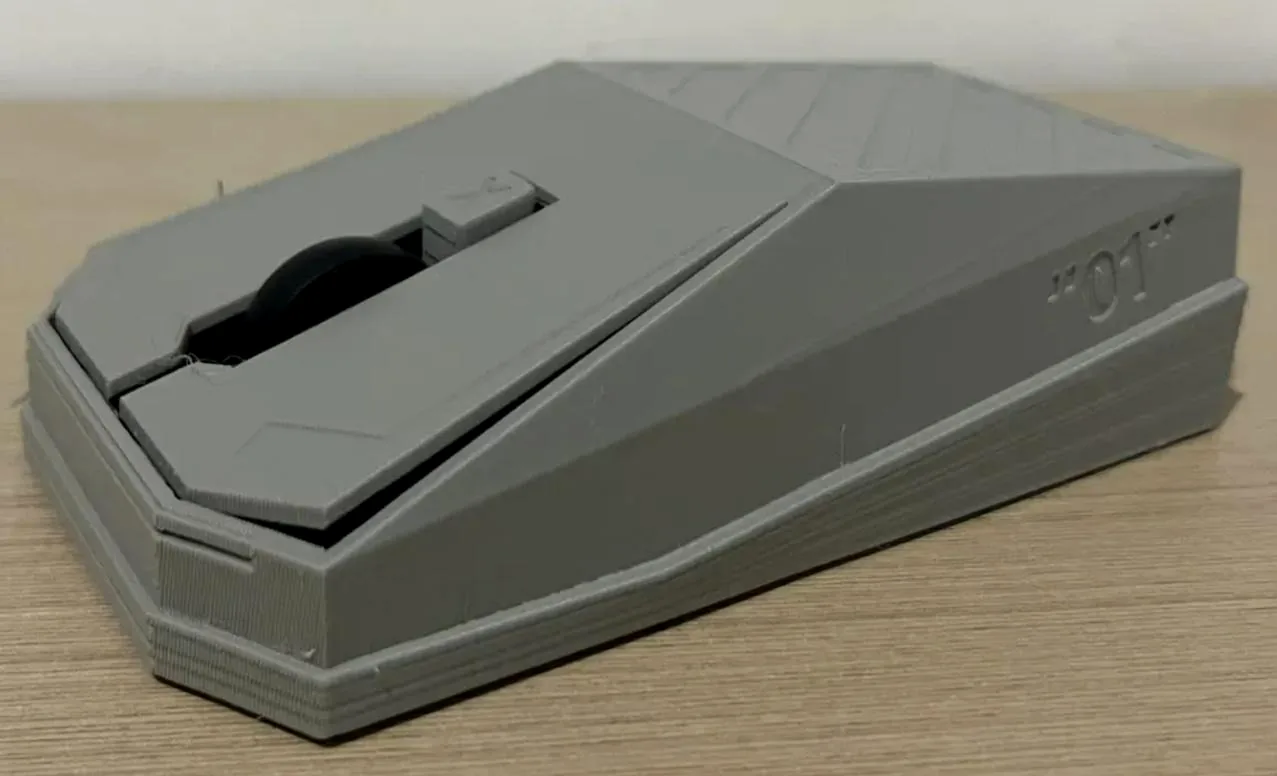
CyberMysz.pl — CyberMysz-Prototyp — digitaler Mitarbeiter-Zwilling
Digitaler Mitarbeiter-Zwilling

CyberMysz sieht den Bildschirm und erledigt wiederkehrende Arbeit.

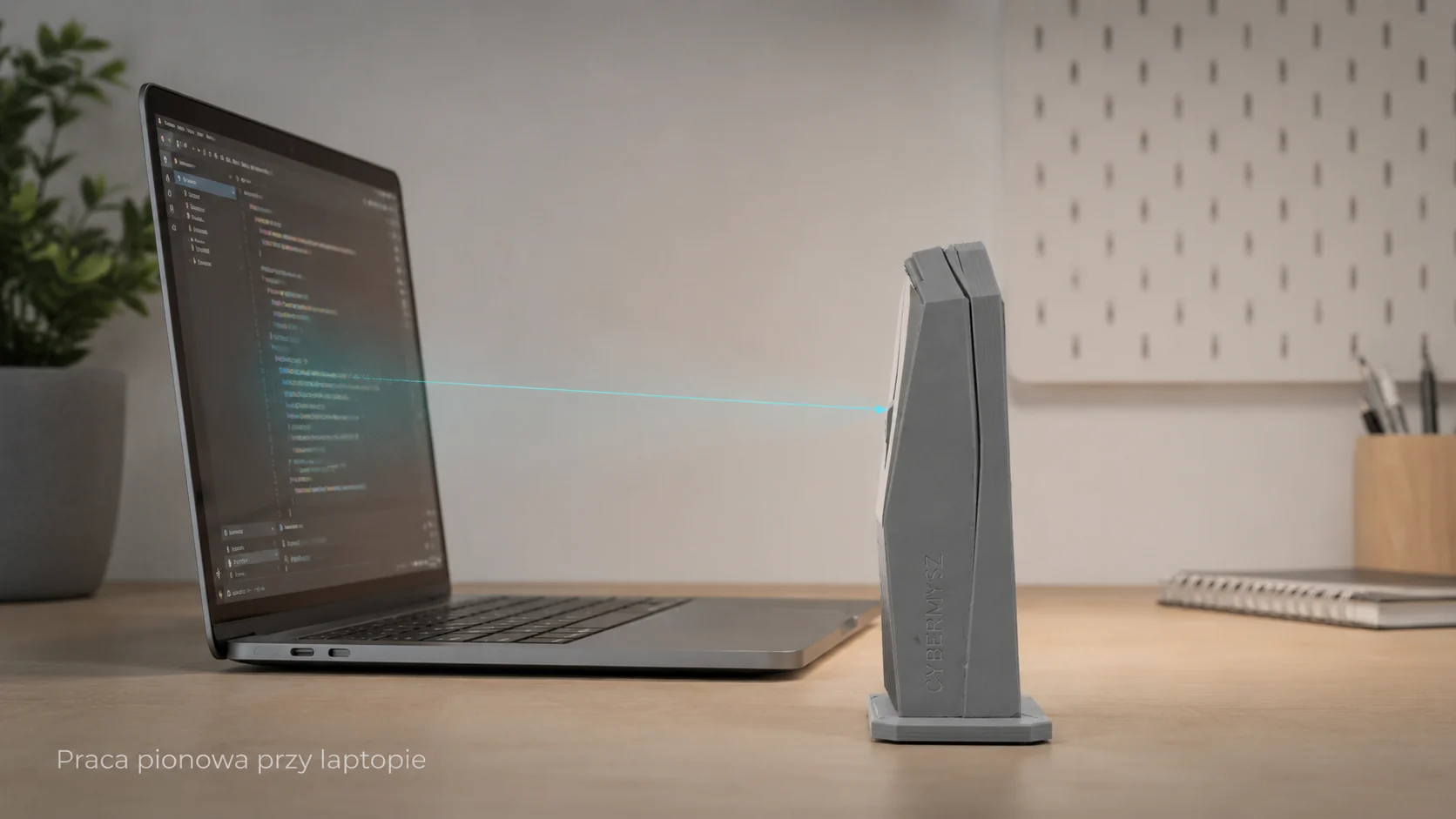
CyberMysz wird angeschlossen, vor den Bildschirm gestellt und übernimmt wiederkehrende Aufgaben: klicken, Daten eingeben, Status prüfen und das Ergebnis melden.

CyberMysz — cyfrowy bliźniak pracownika
sees screen → performs task → saves result
Problem

Not every system can be automated through an API.

In many companies, employees repeat the same steps every day in ERP systems, web panels, remote desktops, terminals and old applications. CyberMysz takes over such tasks without rebuilding the system.

1

Human-dependent process

An employee sees the screen, copies data, clicks and checks messages. CyberMysz can reproduce this way of working.

2

No system rebuild needed

CyberMysz works next to the computer and uses the screen, keyboard and mouse instead of requiring an API integration.

3

Employee time loss

Copying data, retyping, checking statuses, clicking the same windows and generating reports can be done by a digital twin.

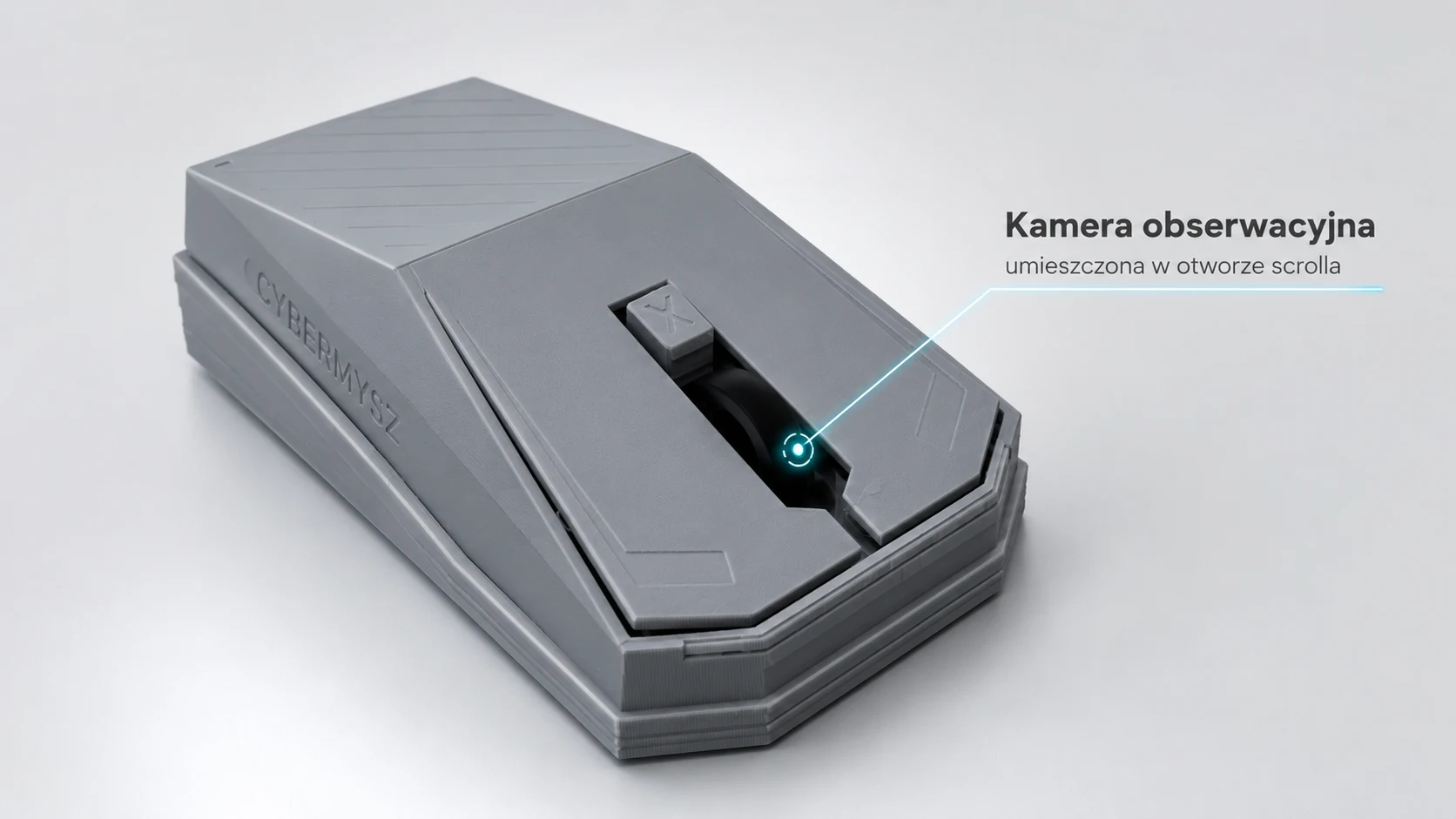
Observation camera in the scroll opening
How it works

CyberMysz works like a digital employee twin.

CyberMysz observes the screen, recognizes what needs to be done, then clicks and enters data like an employee sitting at the desk. ifURI records the execution and result.

SeeThe camera observes the screen or a selected workstation area.
UnderstandA scenario verifies text, layout, color, icon or application state.
ActCyberMysz moves the cursor, clicks, uses shortcuts and types text.
ifURI scenarios

CyberMysz ist ein digitaler Helfer für wiederkehrende Büroarbeit.

In ifURI beschreiben Sie die Aufgabe Schritt für Schritt: was geöffnet, geprüft, angeklickt und eingetragen werden soll. CyberMysz erledigt diese Schritte am Arbeitsplatz und speichert das Ergebnis in der Historie.

1

ifURI Host

The operator builds flows, approves actions, selects the process and sees the execution log.

2

CyberMysz

Screen observation, clicking, typing data and safely performing tasks according to a scenario.

3

Workstation

The computer sees a standard keyboard and mouse. The process runs in the existing application.

Marketplace

Przykładowe zadania, które może przejąć CyberMysz.

Na stronie głównej pokazujemy tylko kilka przykładów. Pełny katalog jest w marketplace.

Sprzedaż

Przepisz dane z maila do CRM

CyberMysz otwiera wiadomość, kopiuje dane kontaktowe i uzupełnia kartę klienta w CRM.

Efekt
Mniej ręcznego kopiowania i szybsze odpowiedzi na zapytania.
Zobacz rozwiązanie
Księgowość

Wprowadź fakturę z PDF do ERP

Odczytuje dane faktury, przełącza okna i wpisuje wartości do formularza w programie księgowym.

Efekt
Mniej pomyłek przy numerach, kwotach i kontrahentach.
Zobacz rozwiązanie
Logistyka

Sprawdź status przesyłek i zamówień

Wkleja numer zamówienia lub przesyłki do panelu, zapisuje status i przygotowuje krótką notatkę.

Efekt
Aktualne statusy bez ręcznego odświeżania wielu paneli.
Zobacz rozwiązanie
Administracja

Zbierz dane do raportu dziennego

Otwiera wskazane systemy, kopiuje wartości i układa je w jednym raporcie dla zespołu.

Efekt
Raport jest gotowy codziennie w tym samym formacie.
Zobacz rozwiązanie
HR

Uzupełnij status kandydatów HR

Przenosi dane kandydatów z formularza do ATS lub arkusza i ustawia status rekrutacji.

Efekt
Porządek w procesie rekrutacyjnym bez przepisywania danych.
Zobacz rozwiązanie
Obsługa klienta

Załóż zgłoszenie reklamacyjne

Pobiera opis problemu, uzupełnia formularz w systemie zgłoszeń i nadaje kategorię sprawy.

Efekt
Szybsze zakładanie spraw i mniej pustych pól w zgłoszeniach.
Zobacz rozwiązanie
Porównanie rynku

CyberMysz na tle KVM, RPA i agentów AI.

Podobny sprzęt HDMI/USB HID istnieje, ale zwykle służy do zdalnej administracji IT. CyberMysz ma być prostsza: urządzenie plus gotowe zadania biurowe w marketplace.

KVMRęczna zdalna kontrola komputera.
RPAAutomatyzacja software, zwykle z licencjami i wdrożeniem.
CyberMyszCyfrowy bliźniak pracownika do powtarzalnych zadań.
Raport PDF

Rynek KVM, AI HID i RPA

Porównanie PiKVM, JetKVM, GL.iNet, TinyPilot, Openterface, HIDAgent, serial-hid-kvm, Power Automate i UiPath.

Czytaj raport na stronie
Offer

Ein Gerät. Ein Preis. BASIC inklusive.

Wir verkaufen CyberMysz für 555 PLN brutto. Es ist ein physischer digitaler Mitarbeiter-Zwilling für wiederkehrende Büroaufgaben. BASIC CyberMysz Cloud ist bei jedem Gerät für 24 Monate enthalten. Der BASIC-Preis von 10 PLN/Monat betrifft nur die Software-Version oder die Zeit nach Ablauf des enthaltenen Pakets.

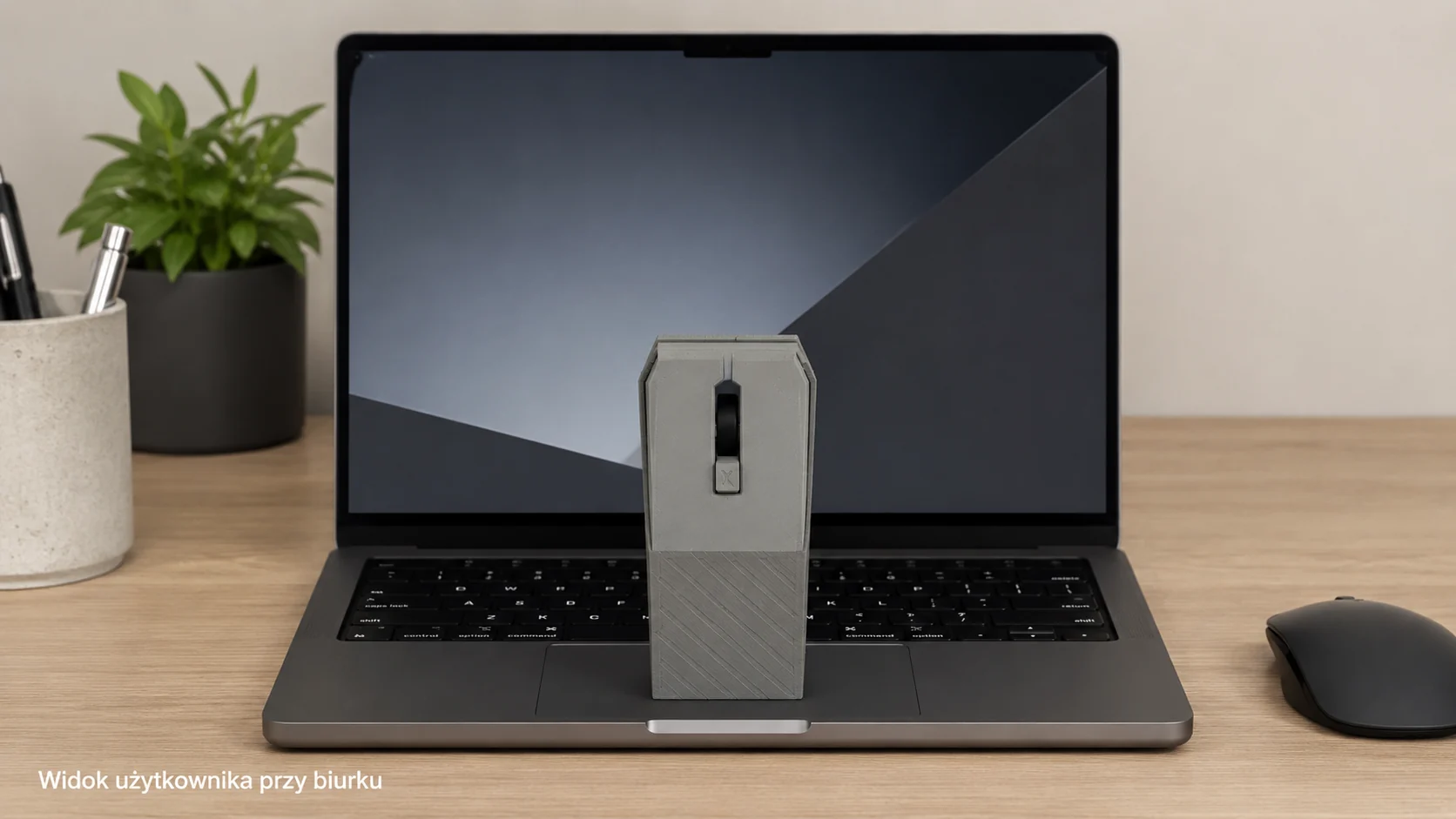
Benutzeransicht am Schreibtisch
Order product

CyberMysz

Ein digitaler Mitarbeiter-Zwilling: Er sieht den Bildschirm, klickt, trägt Daten ein und erledigt wiederkehrende Büroaufgaben nach ifURI-Szenarien.

  • BASIC CyberMysz Cloud is included with every purchased device for 24 months.
  • installations on the employee computer
  • A scenario may require confirmation or be stopped.
Gross price 555,00 zł Net price: 451,22 zł CyberMysz bestellen
CyberMysz Cloud plans — Opcjonalne dodatki

An action is one approved execution step by CyberMysz, for example a click, typing text, checking the screen or running part of a scenario. Monthly volumes do not roll over.

included with device

BASIC CyberMysz Cloud

24 Monate, 1.000 Aktionen/Monat. Das monatliche Volumen verfällt jeden Monat.

0 PLN mit Gerät / 10 PLN mtl. für Software

PRO CyberMysz Cloud

12 Monate, 10.000 Aktionen/Monat, erster Monat 0 PLN. Das Volumen verfällt monatlich.

100 PLN / Monat

PrePaid 10.000 Aktionen

Zusätzliches Volumen für BASIC oder PRO. Das Paket verfällt nach 12 Monaten.

100 PLN / Paket
Software version

Die Software-Version erfasst den Bildschirm als Anwendung. Das ist die Variante ohne physische CyberMysz und erfordert einen aktiven BASIC-Plan ab 10 PLN/Monat.

Sicherheit

Physische Steuerung unter Regelkontrolle.

Das Gerät muss nicht in das Betriebssystem eingreifen. Entscheidend sind freigegebene Szenarien, Logs, Bedienerkontrolle und Stopp-Möglichkeit.

No computer installationCyberMysz works like an external keyboard and mouse connected over USB.
Camera observes the screenIn vertical mode CyberMysz stands in front of the laptop and looks at the monitor.
Log and statusifURI stores route, time, payload, result and history.
Operator STOPA scenario may require confirmation or be stopped.
Vertikale Arbeit am Laptop
Order

CyberMysz bestellen

Variante wählen, Daten eintragen und Bestellung senden. Die Zahlung wird nicht automatisch eingezogen — Sie erhalten Bestellnummer, Statuslink und Zahlungsanweisung.

Bestellübersicht 555,00 zł Anweisung nach Bestellung / optional BLIK
Variant
CyberMysz
Plan
BASIC included
PrePaid
none

Contact and invoice

Buying as

Delivery

Opcjonalne dodatki — BASIC is included with the device. Software requires BASIC PLN 10/mo. PrePaid can be added now or later.

Confirmation

BLIK ist in dieser Version keine automatische Zahlung. Sie können das Feld leer lassen und Zahlungsanweisungen nach der Bestellung erhalten.

After sending, you will receive an order number, status link and payment instructions.

Contact

Describe the process to automate.

Send a short description. We will respond with an audit or pilot proposal, or tell you if a classic API is better.